
AAAxAgents: Your Autonomous Digital Data Scientist
AAAxAgents is a Snowflake Native App that brings autonomous AI agents directly to your data. Acting as a Digital Data Scientist, it automates the complete data analysis lifecycle — from data quality auditing and cleaning to advanced machine learning and demand forecasting — without requiring you to write a single line of code.
Key Capabilities
- Zero-Code Analysis: Point the agent to a dataset and instantly receive insights.
- Automated Data Health: Detects missing values, outliers, and schema issues.
- Predictive Modeling: Autonomous demand forecasting and resource planning.
- Secure & Native: All processing occurs inside your Snowflake account.
Installation & Configuration
Step 1: Get the App
Click the "Get" button in the Snowflake Marketplace to install AAAxAgents in your Snowflake account.
Step 2: Grant Compute Permissions
The application requires a warehouse to run the Streamlit interface and process data.
GRANT USAGE ON WAREHOUSE COMPUTE_WH TO APPLICATION AAAXAGENTS_APP;
You may replace COMPUTE_WH with any warehouse of your choice.
Step 3: Fix “Model Unavailable in Your Region” Error
If you encounter the error "The model is unavailable in your region", this means Snowflake Cortex cross-region inference is not enabled for your account.
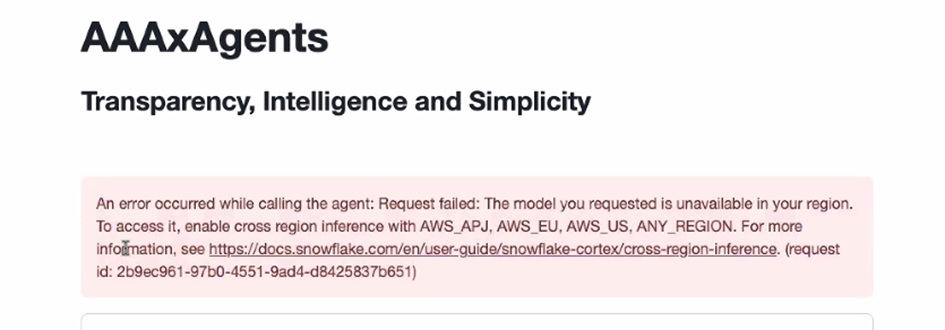
Please reference the official Snowflake documentation below to allow any Snowflake region that supports cross-region inference to process your requests:
Cross-region inference | Snowflake Documentation
The following SQL must be executed using the ACCOUNTADMIN role:
ALTER ACCOUNT SET CORTEX_ENABLED_CROSS_REGION = 'ANY_REGION'; Required for LLM functionality
GRANT IMPORTED PRIVILEGES ON DATABASE SNOWFLAKE TO APPLICATION AAAXAGENTS_APP;
Step 4: Grant Access to Your Data
To allow AAAxAgents to analyze your data, grant access to the required databases, schemas, and tables.
4.1 Grant Database & Schema Access
GRANT USAGE ON DATABASE YOUR_DATABASE_NAME
TO APPLICATION AAAXAGENTS_APP;
GRANT USAGE ON SCHEMA YOUR_DATABASE_NAME.YOUR_SCHEMA_NAME
TO APPLICATION AAAXAGENTS_APP;
4.2 Grant Table Access
Choose one of the following methods based on your security requirements.
Method 1: Grant access to all tables in a schema
 GRANT SELECT ON ALL TABLES IN SCHEMA
 YOUR_DATABASE_NAME.YOUR_SCHEMA_NAME
 TO APPLICATION AAAXAGENTS_APP;
Method 2: Grant access to specific tables only
GRANT SELECT ON TABLE
YOUR_DATABASE_NAME.YOUR_SCHEMA_NAME.YOUR_TABLE_NAME
TO APPLICATION AAAXAGENTS_APP;
Using the Interface
- Launch the App: Open AAAxAgents from the Apps tab in Snowsight.
- Select Data Source: Choose the database and schema you granted access to.
- Choose Analysis Mode:
- Data Health: Audit nulls, duplicates, and outliers.
- Forecasting: Select a target column and time column for predictions.
- View Insights: Interactive charts and narrative summaries are generated automatically.
FAQ
Q: Does my data leave Snowflake?
A: No. AAAxAgents is a Snowflake Native App. All computation happens within your account.
Q: Do I need to know Python or SQL?
A: No. The app is designed for business users with a point-and-click interface.
Q: What permissions are required?
A: Warehouse usage and read-only (SELECT) access to the datasets you wish to analyze.
Q: Can I use this on any dataset?
A: Yes. AAAxAgents supports structured data across multiple industries.